
Article Marketing / Communications 5 min read
Apple’s iOS7 Interface Revamp: 4 Things You Should Consider
Last week’s announcement of an interface revamp for iOS7 got mixed reviews, but with end users likely to upgrade to the platform quickly, it could force app makers in the association world to answer some tough questions about their needs.
Heads up: this content is over 5 years old, so some information may be out of date.
I admit, I’m a bit of an Apple nerd.
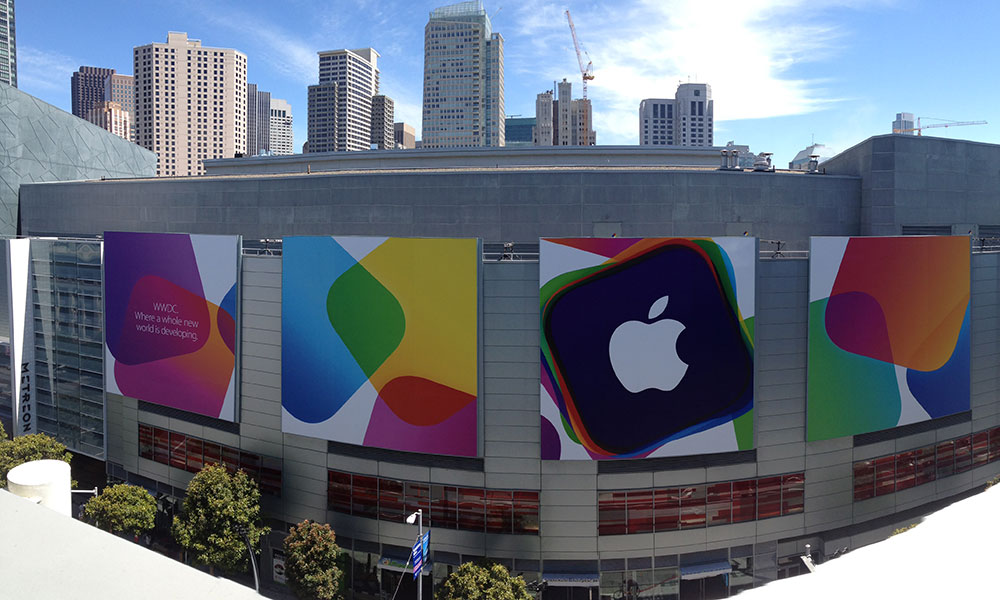
So when my developer friend started sending me play-by-play emails from the company’s Worldwide Developer’s Conference (WWDC) in San Francisco last week, I was pretty excited to hear about the details. (It appeared to involve a lot of standing in line, but he did get to see Vampire Weekend, which is a pretty hip band to play at a conference, no matter the company.)
The fanfare level was high about one of the products announced on the conference stage: iOS7 (opens in a new tab), the latest version of the operating system that drives the iPhone and iPad. But some who didn’t make the trip to San Francisco last week may have felt something a little closer to dread than joy at hearing the news.
Why’s that? Well, for the first time in the history of the platform, the visual interface will change significantly, breaking a longstanding mold. Apple has tinkered under the hood in the five years the platform has been available for developers. But this front-facing revamp—which is getting mixed reviews (opens in a new tab), some of them mocking (opens in a new tab)—will make apps that haven’t kept up with Apple’s pace stick out like sore thumbs.
The new interface design will force those who’ve invested in an App Store presence over the years to make some tough choices. Here are some things to keep in mind about the iOS7 interface revamp:
Apple’s iOS7 is being praised for its revamped interface, but it’s being criticized for its color usage and icon design. (Apple photo)
The changes, in plain English: In a piece for ReadWrite (opens in a new tab), its mobile editor Dan Rowinski breaks down exactly what user interface designers should expect from iOS7: changes that could affect fonts, layouts, interfaces, and—most worrying for small staffs—overall approach. But all is not lost, he explains, as Apple has created tools for programmers to quickly update their interfaces. “If you chose to create most of your buttons and menus and other simple functions using Apple’s standard iOS principles, then the Auto Layout function in Xcode will automatically update them for you,” Rowinski notes. “If you don’t use Auto Layout…well, time to get cracking on manually updating your custom design elements.” Rowinski’s piece is a good primer on what you should expect on the design front.
Expect to redesign: After the announcement, Macworld asked several app development houses (opens in a new tab) their take on the iOS7 changes, particularly what sort of problems it could cause. Most developers the magazine talked to said they would have to redesign their apps—a pain, albeit a temporary one. “The challenge, though, will be during the transition phase. Some users will prefer ‘traditional’, iOS6-like appearance in the applications, while others will be looking for the new design,” Igor Zhadanov, the CEO of app developer Readdle, told Macworld. “This will fragment the market for some time (6-12 months) and will create extra pressure for developers.” ReadWrite‘s Rowinski also speaks to this, suggesting that those who choose not to redesign are going to regret it. “If you think you can update your app and sneak it by Apple’s App Store review board without updating the UI, you are going to be very sorry,” he writes.
There are benefits here: While the revamp creates challenges, some developers see this as a positive for the platform. Among them is Tumblr cofounder Marco Arment (opens in a new tab), the creator of Instapaper (opens in a new tab) and The Magazine (opens in a new tab) as well as one of the biggest names in app development. “Apple has set fire to iOS,” he writes in his blog. “Everything’s in flux. Those with the least to lose have the most to gain, because this fall, hundreds of millions of people will start demanding apps for a platform with thousands of old, stale players and not many new, nimble alternatives.” As Arment notes, this could be a good or bad thing, depending on where you stand. If you’re less established, it could prove an effective way to stand out to tech-savvy users. If you’re a market leader, however, it may be hard to balance the new and the old.
Think like the competition: The truth here is that many of the issues created by the revamp—the fragmentation, the incoherency in look—are not new to Android platform developers, who have long faced the challenges caused by numerous screen sizes, a slower-to-upgrade user base, and different types of skins used by different manufacturers. If your development staff is fluent in both iOS and Android, they’ve dealt with such fragmentation in the past, and it could help ease the transition. Likewise, as the design visually has much in common with the Windows Phone platform, those experienced with that platform can offer helpful insights.
For associations, investing in app development isn’t a cheap endeavor. But there’s a strong argument to be made for trying to keep up in this case.
Why? Well, iOS users upgrade their devices quickly. Even with the negative reaction to Apple Maps, nearly all iPhone and iPad users are on iOS6 these days (opens in a new tab), a trend likely to continue with iOS7.
The question comes down to this: Are you seeing a strong ROI with your apps, and will it decline if you’re not keeping up with the latest trends?
Something to think about next time you hear Vampire Weekend on Spotify.
San Francisco’s Moscone Center, the home of Apple’s WWDC 2013. (photo by Zaid Al-Timimi)

Comments
Comments are for ASAE members. Learn more about comments on this site.
Log in to your member account or join ASAE!