
Article Meetings / Events 4 min read
How to Create a “Set” for Virtual Meetings
By investing in a professional remote setup, speakers can improve the virtual event experience for attendees (and themselves).
Heads up: this content is over 5 years old, so some information may be out of date.
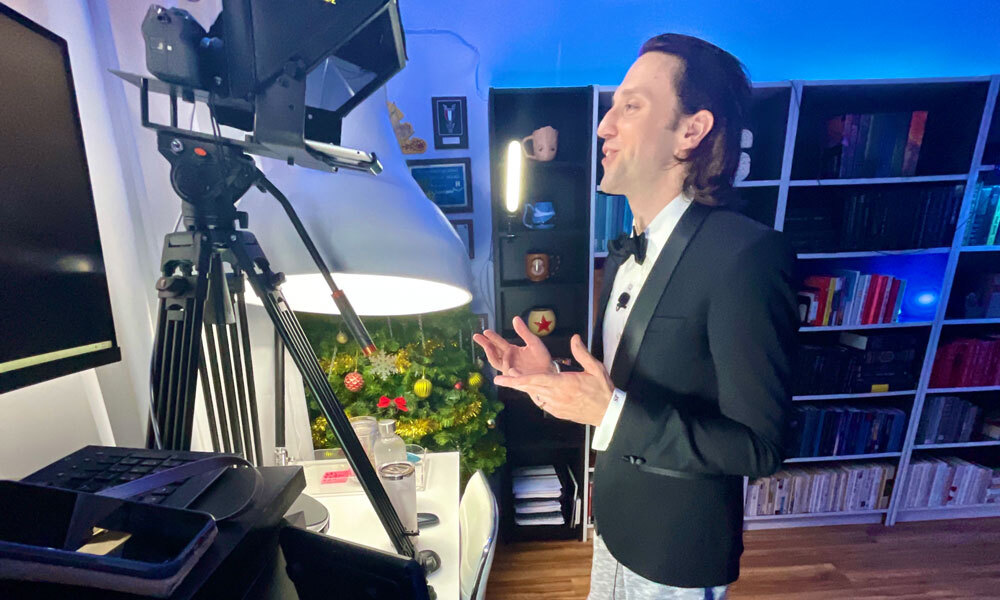
The pandemic may be retreating (opens in a new tab), but virtual and hybrid events are here to stay. So association pros who talk at these gatherings might want to create a home “set” to project the image they want—as opposed to the one conveyed by the messy backgrounds, poor lighting, and choppy audio that have marked many a presentation over the past year.
“I don’t think it’s as hard as people think to have a good setup,” says Josh Sundquist, a motivational speaker, author, and comedian with a long history of speaking on camera to a virtual audience on social media (opens in a new tab) and YouTube (opens in a new tab).
While the pandemic gave us a glimpse into the home lives of our colleagues—and sparked conversations about work-life balance, as evidenced by guest appearances by kids, pets, and other family members—people who speak regularly may want to invest in a setup. And it is an investment. “The biggest piece of this is that it costs money,” Sundquist says. “It depends on how much money your association is giving you to spend, in my opinion.”
Want to present a more professional image at your next virtual speaking engagement? Consider these tips from Sundquist.
Down to the Wire
A recent technological trend has been wireless everything, from earbuds and speakers to keyboards and mice. But for speaking at a virtual event, Sundquist says to use as many wired devices as you can. Opt for:
- An ethernet connection instead of Wi-Fi
- A wired USB microphone instead of a radio frequency mic
- Wired headphones, not Bluetooth, if you need to listen to audio during your presentation
- A wired camera, as opposed to a Bluetooth webcam
Sundquist argues that using wireless devices increases the chances of technical hiccups during an event, as you’re completely reliant on wireless signals that could interfere with each other or disconnect. Plus, wired devices are generally considered (opens in a new tab) to be of higher quality (opens in a new tab) than their wireless counterparts.
Get a Microphone
A computer’s built-in microphone often produces quiet, fuzzy, or echoey audio, and may pick up background noise. When Sundquist is presenting, he says he uses a USB lavalier microphone that is wired into his computer and clips to his shirt.
“It’s inexpensive—it’s like $30 on Amazon—and it works great. It largely isolates the sound,” he says.
Use an External Camera
“For a Zoom meeting, your built-in webcam is entirely adequate. I would suggest that if you’re trying to hold an event, you upgrade from there,” Sundquist says.
Like built-in mics, built-in computer cameras have their limitations, often offering poor resolution. A budget-friendly step up would be an external webcam, which usually offers better video quality (opens in a new tab) and the ability to adjust the camera angle.
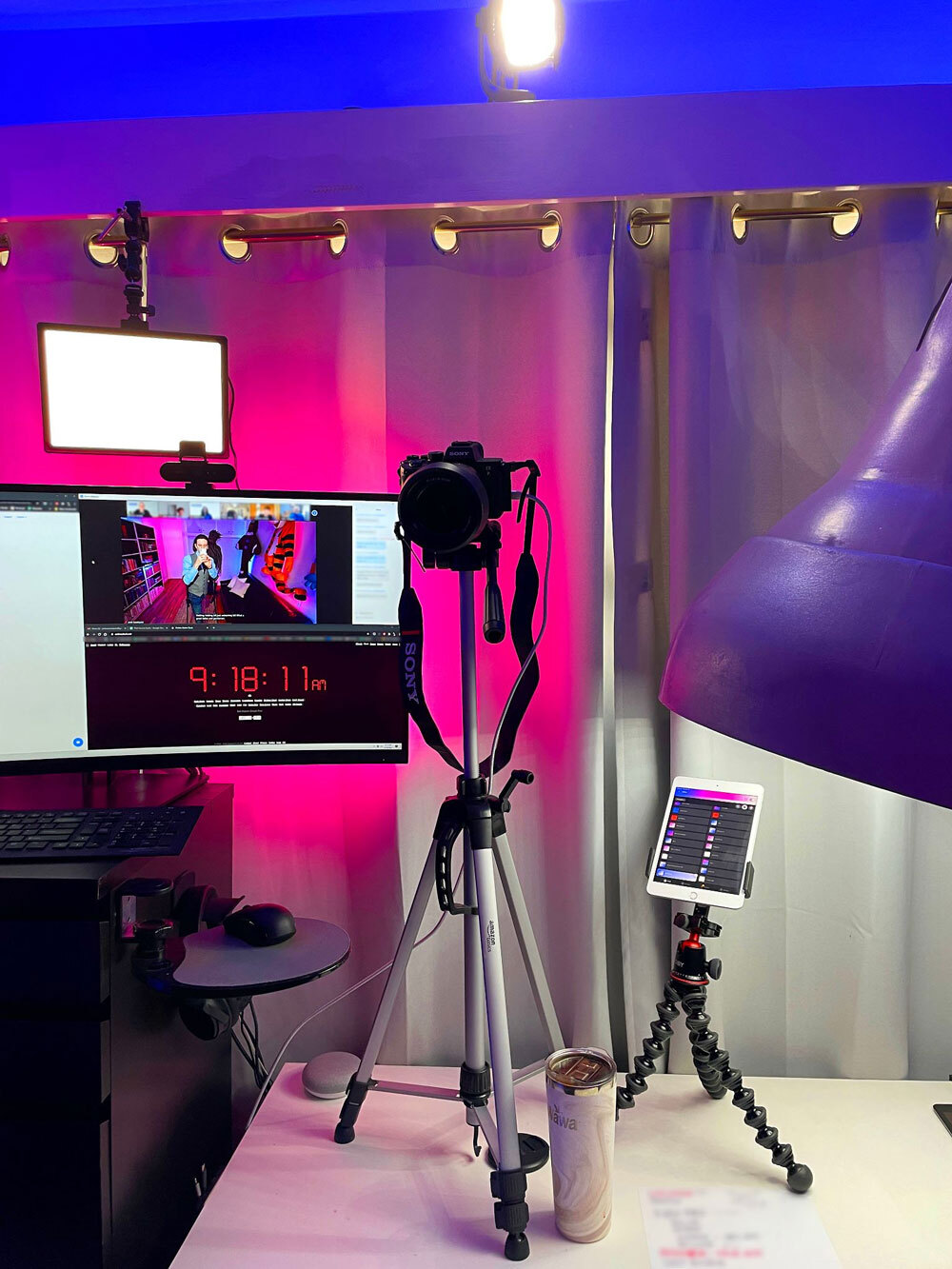
A behind-the-scenes look at Sundquist’s camera and monitor setup. (Handout photo)
But Sundquist warns that there’s a limit to how good a webcam’s video quality can be. If you want professional-grade video, look for more powerful (and expensive) equipment such as camcorders, DSLRs, or mirrorless cameras, which can be turned into high-end webcams by using software such as Sony’s Imaging Edge Webcam (opens in a new tab).
External cameras can be placed on a tripod and adjusted so you can get an ideal camera angle: slightly above eye level and pointing downward, thus avoiding the up-the-nose angle you’ve probably seen before.
Invest in Good Lighting
Lighting is one of the biggest challenges for virtual speakers. You can improve your lighting significantly with a couple of LED panel lights. Place them above your camera on each side, pointing down at you at a 45-degree angle. LED lights produce a flattering glow and can go for less than $50 depending on the model. If you have three light sources—and experience with professional lighting—you can follow the three-point lighting method (opens in a new tab) for ideal positioning.
If you don’t have as much room, you can use smaller ring lights that clip onto your monitor. You can also use any natural light by arranging your setup so that you’re facing that light source.
Let Your Background Represent You
“I think background tells a story and people should be conscious of what that story is,” Sundquist says. “There’s nothing in particular that background should be other than something that you’ve thought about and decided you want to represent you or the meeting that you’re in.”
There’s room to express yourself, so long as your background isn’t messy, unprofessional, or inappropriate. You can’t go wrong with a practical background with a bookshelf or a wall with a few pictures behind you. Green screens are an option, but Sundquist says showcasing your real space is better, as the former is impersonal and may come across as low quality.
“It’s just going to look like a bad version of your weatherman,” he says. “Why not lean into the idea of, ‘I’m at my home office, let’s not pretend otherwise. And look at this fun room that I have.’”
Motivational speaker and author Josh Sundquist, shown on his virtual set. (Handout photo)

Comments
Comments are for ASAE members. Learn more about comments on this site.
Log in to your member account or join ASAE!